
The STL Viewer page is designed to preview ready-made 3D models of cities and places available in the Map Creator by MEBLEOS store. This tool is used exclusively for visual inspection of models and for reviewing their structure before downloading or further use.
The viewer allows you to open models as a whole or layer-by-layer, control the visibility of individual map elements, and adjust visual parameters without changing the model geometry.
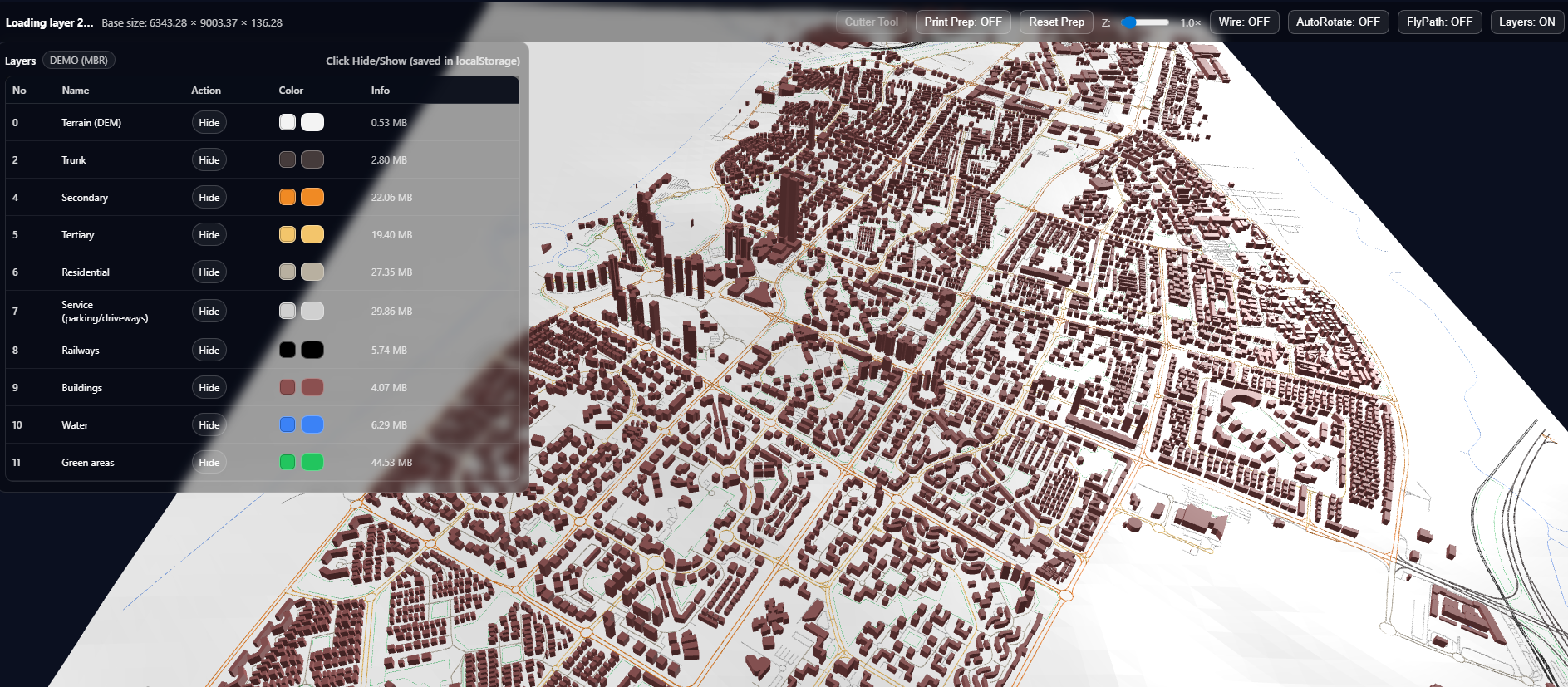
The center of the page shows the 3D model of the selected location. You can freely rotate, zoom, and inspect the model from any angle.
The visualization updates in real time when you change display settings, allowing you to quickly evaluate the model composition and structure.
Each model consists of separate logical layers. You can view all layers together or inspect them individually.
For each layer, the following actions are available:
Each layer is displayed independently and can be enabled or disabled at any time.
Each layer has a default display color. If needed, you can manually change a layer’s color to better distinguish elements or focus on specific objects.
Color changes affect only the visualization in the viewer and do not modify the model itself.
A layers table is shown on the left, listing all model elements.
Using the Layers: ON / OFF button, you can:
The Wire: ON / OFF toggle enables or disables the wireframe display. This mode lets you see the geometry as a mesh framework.
The AutoRotate: ON / OFF toggle controls automatic rotation of the model around its axis.
The FlyPath: ON / OFF mode enables or disables automatic camera movement along a flight path around the model.
The Print Prep: ON / OFF feature is intended for visual preparation related to splitting the model into blocks.
When enabled, additional elements related to dividing the model into parts are displayed.
The STL Viewer is used for:
All changes made on the preview page affect only the visual representation of the model.